1
When using LED lights at night or in light-sensitive environments such as libraries, can they be completely turned off? Will turning them off affect heat dissipation?
It can be completely turned off without affecting the heat dissipation function. The LED light status can be toggled by lightly pressing the power button; when completely off, only the fan cooling function remains. The LED light and cooling fan are designed with independent circuits and do not interfere with each other. Even when the light is off, the fan continues to run stably at 1500 RPM, and the cooling efficiency is not affected in any way. Suitable for use in low-light environments such as libraries and bedrooms at night.
2
What are the core advantages of the S30 laptop cooling pad?
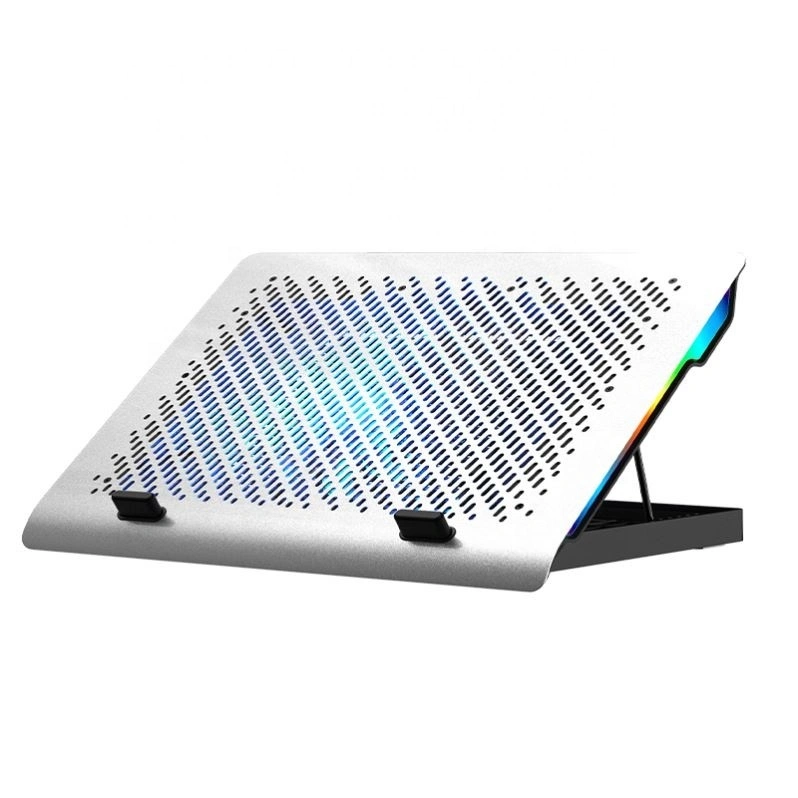
Its core advantages are "stable cooling with a single fan at 1500 RPM + silent design + multi-color adjustable LED ambient lighting + 15.6-17.3 inch wide-range compatibility + 6-level ergonomic angle adjustment", balancing cooling efficiency, user comfort, scene atmosphere and compatibility; designed specifically for people who use laptops for long periods of time, especially suitable for gamers (high-load game cooling + multi-color atmosphere creation), e-sports entertainment, library study and other multi-scene usage needs; compatible with mainstream laptops from 15.6-17.3 inches, including heavy gaming laptops.
3
Which laptop models does the stand support? Can it be used on laptops with thick cases or cooling pads?
Compatible with mainstream laptops ranging from 15.6 to 17.3 inches, including models such as Lenovo Legion Y9000P, Huawei MateBook 16, Xiaomi Redmi G series, and Apple MacBook Pro 16; supports stable placement of laptops with protective cases ≤5mm thick. For models with built-in simple cooling pads, the cooling pad has a 15mm ventilation gap and will not block the ventilation holes on the bottom of the laptop; it is not recommended to place heavy metal-cased laptops with a thickness exceeding 8mm to avoid exceeding the load-bearing capacity and causing instability.
4
What are the characteristics of the material and heat dissipation structure of a cooling pad? Will it scratch the laptop casing?
The surface is made of aluminum alloy, and the base is made of high-strength ABS material, balancing thermal conductivity and portability. The aluminum alloy panel has honeycomb ventilation holes (with an opening rate of 65%), providing excellent thermal conductivity. All contact areas of the laptop are covered with anti-slip silicone strips, and the base is equipped with 4 high-adhesion anti-slip pads. The aluminum alloy panel is treated with anodizing, resulting in a smooth and burr-free surface. The silicone strips are soft to the touch and have strong friction, which can firmly fix the laptop and prevent scratches and dents caused by direct contact with the outer shell. The heat dissipation structure adopts a "single turbine fan + airflow channel" design, with cool air blowing directly to the core heat-generating area at the bottom of the laptop for more precise heat dissipation.
5
What could be causing the LED light to not light up or to flicker after startup? How can I troubleshoot it?
Common causes and troubleshooting methods: ① Unstable power supply: Replace the original USB-C cable or try connecting an external 5V/2A power adapter to rule out poor cable contact or insufficient power supply; ② Sticky light control button: Press the power button several times to check if the button rebounds smoothly and avoid foreign objects blocking it; ③ Poor contact of LED beads: Turn off the power and unplug the cable, gently press the LED light strip area (panel edge) to rule out looseness; ④ Fault problem: If the above operations are ineffective, it may be a fault in the light control circuit. You can contact official customer service to apply for warranty repair.
6
Will the aluminum alloy panel overheat after prolonged use of a cooling pad? Will it burn the skin or damage the desktop?
It won't overheat and offers excellent safety. The aluminum alloy panel has good thermal conductivity, evenly conducting and quickly dissipating the heat emitted by the laptop. After prolonged use (24 hours), the maximum panel temperature is ≤42℃ (within the comfortable range for human touch), preventing skin burns. The panel temperature is also below the heat resistance threshold of most desktop materials (wood, glass, gaming desks), ensuring no damage to the desktop.
7
How effective is the cooling pad? How much temperature does it reduce? What is the fan speed?
The heat dissipation performance is stable. In actual tests at a room temperature of 25℃, running a large game for 30 minutes can reduce the CPU temperature of the laptop by 6-12℃ and the GPU temperature by 4-9℃. It is equipped with a turbine silent fan with a speed of 1500±10% RPM, which balances heat dissipation and quiet operation, making it suitable for most daily use scenarios.
8
What power supply does the cooling pad use? Will it occupy a laptop's USB port?
It adopts a dual USB-C power supply design and supports two power supply modes: ① Powered by the laptop's USB-C port (plug and play); ② Powered by an external 5V/2A power adapter (not included); It is equipped with a "one-for-one" USB expansion port, and there is a USB 3.0 output port next to the power supply port, which will not occupy the laptop's USB port resources and meet the needs of different desktop placements.
9
What angle adjustments does the cooling pad support? What scenarios are the six adjustment levels suitable for? Is it ergonomic?
It supports 6-level angle adjustment, ranging from 10° to 35°. The 6 levels correspond to 13° (flat placement for heat dissipation), 20° (light web browsing), 25° (online learning/document editing), 30° (long-term office work), 35° (e-sports entertainment), and 40° (video editing/drawing). It can be precisely adjusted to eye level according to different usage scenarios to minimize neck fatigue and conform to ergonomic design.
10
When using a cooling pad, will the stickers on the bottom of the laptop (such as warranty stickers or brand stickers) fall off due to high temperatures?
It will not cause the sticker to fall off. The core function of the cooling pad is to lower the temperature of the bottom of the laptop, not to raise it. In actual tests, after the cooling pad was applied to the bottom of the laptop, the temperature of the sticker area was 6-12℃ lower than that without the cooling pad, which is within the normal temperature range. Sticker falling off is mostly caused by the aging of its own adhesive or high temperature environment (such as direct sunlight), and is unrelated to the use of the cooling pad. If the sticker itself has weak adhesive, you can reinforce the edges of the sticker before use to prevent it from falling off.
11
Does the cooling pad come in multiple colors? Does the LED light color match the body color?
Currently available in Obsidian Black and Moonlight Silver, both feature a matte frosted finish for a smooth texture and resistance to fingerprints. The LED light is multi-color adjustable, with the body color precisely matching the LED's base color. A long press of the power button switches to other colors to suit different scenarios.