1
Regarding connection stability and latency: Is the wireless connection stable? Is there any latency when playing games or typing quickly?
① Gaming and High-Speed Typing: The 2.4GHz mode is recommended. It uses a dedicated wireless channel with virtually no signal latency, offering performance comparable to a wired keyboard, perfectly meeting the needs of gaming, programming, or high-speed document processing.
② Everyday Use and Mobile Office: Bluetooth mode allows for convenient connection to tablets, phones, and other devices, providing greater flexibility.
③ Interference Issues: Occasional lag may be due to interference from nearby USB 3.0 devices or Wi-Fi router signals. You can try placing the receiver closer to the keyboard in an unobstructed location using an extension cable, or temporarily turning off other wireless devices to troubleshoot. The keyboard itself is very stable.
④ Gaming-Grade Wireless Performance: Utilizing 2.4GHz wireless technology, it achieves extremely low latency comparable to wired connections, ensuring responsive and smooth operation.
2
Regarding switching between multiple devices: Is it troublesome to switch between computers, tablets, and mobile phones?
Switching is incredibly convenient, which is precisely the core advantage of the CK11! It supports one-click quick switching.
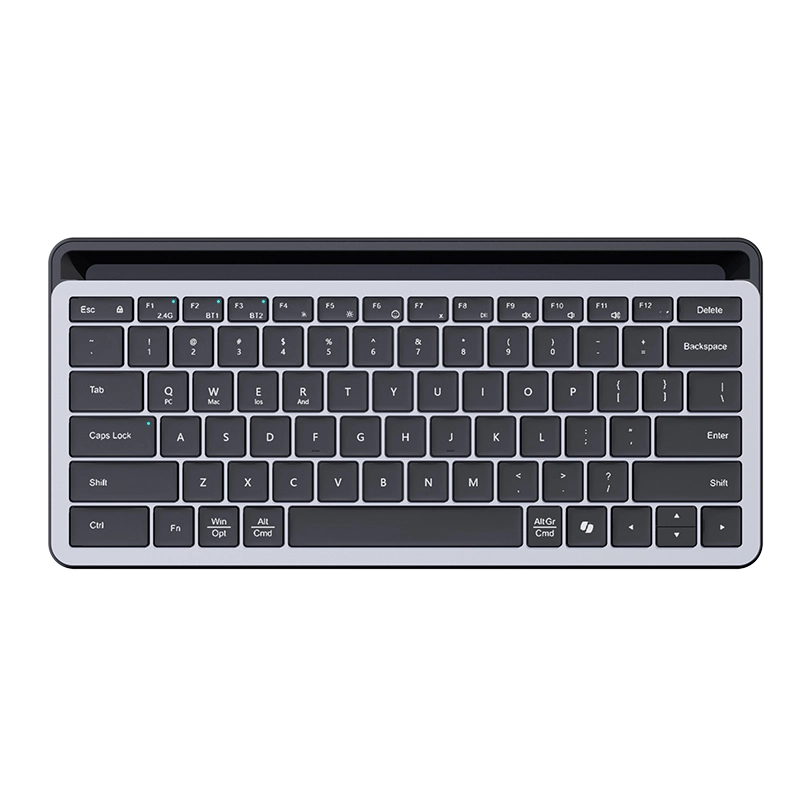
How to operate: You can instantly switch between the three paired devices using the dedicated device switching keys on your keyboard (or the Fn+1/2/3 key combination). For example, you can pair channel 1 with your desktop (using 2.4GHz), channel 2 with your laptop (using Bluetooth), and channel 3 with your standard device.
Use cases: Switch between your desktop and laptop while working; after get off work, switch to your tablet with a single click to watch videos or chat. The entire process requires no re-pairing, truly achieving high efficiency and seamless operation.
Highly efficient multitasking tool: It can pair and remember up to 3 devices simultaneously, allowing for quick one-click switching and easy management of cross-screen workflows.
3
Regarding battery life: How long will the battery last? Can I use it while charging when it's out of power?
The CK11 boasts exceptionally long battery life and is designed with emergency use in mind.
Battery life: Under normal office use with the backlight off, a single charge typically lasts for several weeks to several months (please refer to the official data on the product page for specific durations). The keyboard features an intelligent sleep function, automatically entering power-saving mode when idle.
Charging and usage: It uses a mainstream USB-C charging interface and supports charging while in use. Even if the battery runs out, simply plug in the charging cable, and it instantly transforms into a wired keyboard to continue working, without interrupting your work.
Long battery life, worry-free use: With a built-in high-capacity battery, it supports charging while in use. When the battery is low, simply plug it in to instantly transform into a wired keyboard, ensuring uninterrupted work.
4
Regarding the keyboard feel: Is it a mechanical keyboard? How does it feel? Is it suitable for long typing sessions?
Yes, the CK11 is a mechanical keyboard, and its core advantage lies in providing a comfortable, consistent, and durable feel for extended typing sessions.
Tactile Feel Description: It uses (please fill in according to product information, e.g., Gateron Red switches). These switches have a light actuation force, a linear, non-tactile feel, rapid response, and relatively quiet operation, effectively reducing finger fatigue. They are ideal for users who need to type, program, or write for extended periods.
Durability: Mechanical switches typically have a lifespan of tens of millions of keystrokes, far more durable than ordinary membrane keyboards, making them a worthwhile investment in productivity tools.
Professional Mechanical Feel: Equipped with high-quality mechanical switches, it offers sensitive actuation and a consistent feel, providing a comfortable experience for long typing sessions and efficient work.
5
Regarding compatibility and after-sales service: Is it compatible with my system? What is the warranty policy?
Wide compatibility and reliable after-sales service.
System Compatibility: CK11 is fully compatible with mainstream operating systems such as Windows, macOS, iOS, and Android. When connecting to different devices, some multimedia shortcut keys will automatically adapt (for example, on a Mac, the Alt key becomes the Option key).
Warranty Service: We provide an official warranty (please specify the duration, e.g., one year). During the warranty period, we offer free repair or replacement for performance failures not caused by human error. Please keep your purchase receipt safe after purchase. For after-sales support, please contact our customer service at any time.
Wide Compatibility, Reliable Guarantee: Connect and use immediately across all platforms and enjoy official warranty service, ensuring worry-free purchase and use.
6
Is the angle of the stand fixed or adjustable? Is the equipment stable after placement?
The stand is designed to maintain a fixed office viewing angle (adapting to a comfortable viewing/typing posture) and features an anti-slip design, making it less likely for phones and tablets to slip off, and providing good stability.
7
Does the keyboard automatically go into sleep mode if it's not used for a long time? How do I wake it up?
After approximately 10 minutes of inactivity, it will automatically enter sleep mode (to save power). Pressing any button will wake it up without needing to reconnect the device.
8
Is the keyboard stand detachable?
The stand is an integrated design of the keyboard and cannot be disassembled separately. The integrated structure ensures the stability of the stand and overall portability.
9
I lost my original charging cable. Can I use another Type-C cable to charge it?
Yes! You can use a reputable brand's Type-C charging cable; it won't affect charging efficiency or keyboard stability.
10
How do I clean a dirty keyboard? Can I rinse it with water?
It is recommended to gently wipe the keys and surface with a dry, soft cloth or alcohol wipes; do not rinse with water or soak with a damp cloth to avoid short-circuiting and damaging the internal circuitry of the keyboard.