
loading

New Arrival • Flextri F5 Laptop stand

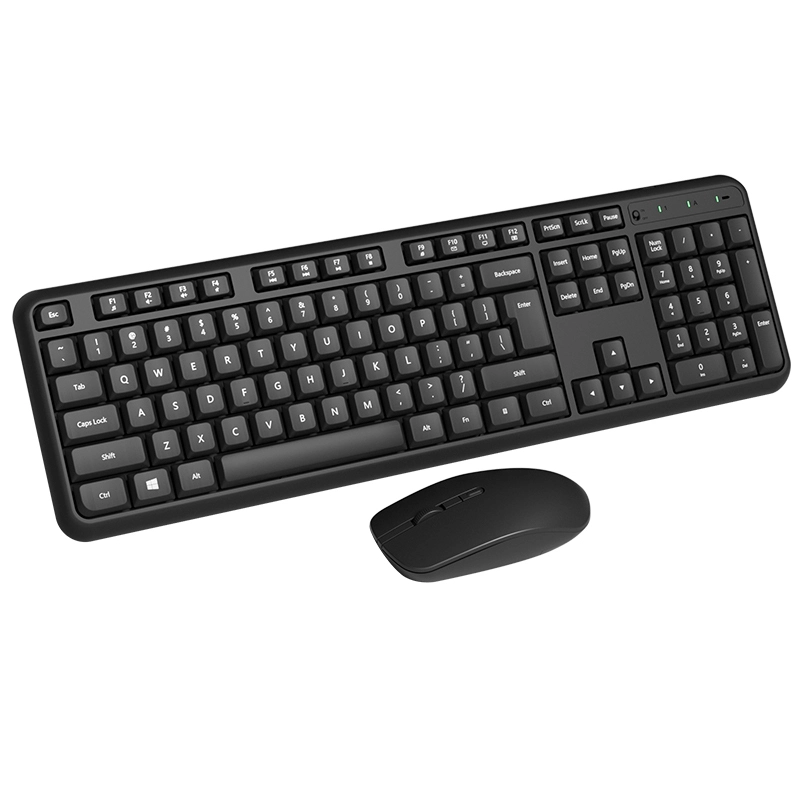
ZUERST -CK23 Wireless keyboard and mouse combo 1
ZUERST -CK23 Wireless keyboard and mouse combo 2
ZUERST -CK23 Wireless keyboard and mouse combo 3
ZUERST -CK23 Wireless keyboard and mouse combo 4
ZUERST -CK23 Wireless keyboard and mouse combo 5
ZUERST -CK23 Wireless keyboard and mouse combo 6
ZUERST -CK23 Wireless keyboard and mouse combo 7
ZUERST -CK23 Wireless keyboard and mouse combo 8
ZUERST -CK23 Wireless keyboard and mouse combo 9
ZUERST -CK23 Wireless keyboard and mouse combo 1
ZUERST -CK23 Wireless keyboard and mouse combo 2
ZUERST -CK23 Wireless keyboard and mouse combo 3
ZUERST -CK23 Wireless keyboard and mouse combo 4
ZUERST -CK23 Wireless keyboard and mouse combo 5
ZUERST -CK23 Wireless keyboard and mouse combo 6
ZUERST -CK23 Wireless keyboard and mouse combo 7
ZUERST -CK23 Wireless keyboard and mouse combo 8
ZUERST -CK23 Wireless keyboard and mouse combo 9

ZUERST -CK23 Wireless keyboard and mouse combo

🔹 2.4Ghz Wireless Connection:This combo share a nano USB receiver, no need to take upadditional USB ports (Also the wireless keyboard and mouse can also be used separately). Plug and play, no software needed,convenient and efficient.
🔹 3 DPI Adjustable Wireless Optical Mouse: This slim wireless mouse boasts a DPI of up to 1600, enabling effortless and sensitive cursor control that smoothly tracks the cursor on various surfaces. The ergonomic keycap design provides a smoother typing experience, allowing you to enjoy comfortable typing whether in the office or at home.
🔹 Silent input won't disturb others: The soft membrane keys provide a quiet and comfortable typing experience, allowing you to type confidently on this wireless keyboard designed for comfort, precision, and smoothness. The wireless mouse uses silent micro-switches, making clicks virtually silent.
🔹 Anti-slip and durable design: The keyboard has anti-slip feet on the bottom, and the mouse has a frosted texture on the side, making it less likely to slip during use; the keycaps/mouse shell are made of wear-resistant ABS material, which is not easy to peel off even after long-term use.
🔹 Compatibility: Seamlessly compatible with Windows, macOS, Linux, ChromeOS, iPadOS, and Android operating systems.
$ 0% OFF
00d
00:
00:
00
Details
5.0
order
quantity:
pieces available sold out
MOQ:
200 Piece
Shipped to:
Choose a country/region
Shipping
Shipping Country/region Estimated Delivery Time Shipping Cost
This Supplier/Shipping Company does not deliver to your selected Country/Region.
Shipment within 1 hours after placing the order
design customization

    oops...!

    no product data.

    Go to homepage
    payments:
    quantity
    Discount
    price
    5-2 (5)

    Single receiver shared

    This combo share a nano USB receiver, no need to take upadditional USB ports (Also the wireless keyboard and mouse can also be used separately). is plug-and-play with no additional pairing required.

    Dual mode connection

    It supports both 2.4G and Bluetooth, ensuring both "stable low latency" and "multi-device compatibility".

    6-2 (6)
    3-2 (6)

    Global mute

    With soft and responsive keys,this keyboard and mouse combo gives a quiet typing experience,typing noise level as low as 35 decibels (close to ambient sound), a quiet experience,Work or home without disturbing others.


    Full-size keyboard set

    The keyboard retains a dedicated numeric keypad (suitable for data entry), and the mouse features an ergonomic, symmetrical design, catering to basic operational needs such as office typing and everyday entertainment.

    9-2 (5)
    1
    Is this keyboard and mouse combo wired or wireless? Which connection methods does it support?
    It is a wireless keyboard and mouse set that supports dual connection methods of "2.4G wireless + Bluetooth" and can flexibly adapt to the connection needs of different devices.
    2
    Do the keyboard and mouse need to be plugged into separate receivers?
    No, you don't need one; just one USB receiver is enough to connect both the keyboard and mouse, saving you the need for multiple USB ports on your device.
    3
    Is the keyboard noisy when typing? Is it suitable for use in quiet environments?
    The keyboard features a silent key design, making typing noise significantly lower than that of ordinary mechanical keyboards, making it suitable for quiet environments such as offices, libraries, and bedrooms at home.
    4
    What is the mouse's DPI setting? Is it adjustable?
    The mouse supports 3 DPI settings, up to 1600 DPI, allowing users to switch between different operation precision settings for various scenarios such as office work and web browsing.
    5
    What power supply do the keyboard and mouse use? How is their battery life?
    Powered by dry cell batteries (usually compatible with AA batteries), the keyboard lasts approximately 6 months and the mouse lasts approximately 3 months based on 8 hours of daily use (actual usage may vary).
    6
    Do I need to install drivers the first time I use it?
    No additional drivers are required; it's a "plug and play" device: simply connect to a 2.4G receiver or pair via Bluetooth to use it directly.
    7
    Can it connect to multiple devices simultaneously? For example, via Bluetooth to a phone and via 2.4G to a computer?
    The keyboard supports dual-device switching between "2.4G + Bluetooth", and can be paired with a computer (2.4G) and a mobile phone (Bluetooth) at the same time; the mouse follows the device connected to the receiver by default, making operation more flexible.
    8
    What are the pairing steps for Bluetooth connection?
    Turn on the keyboard's Bluetooth switch, find the set name in the Bluetooth list of your device (such as a mobile phone or tablet), and click "Pair" to complete the connection.
    9
    Can I buy a replacement receiver if it's lost?
    You can contact customer service to purchase an original receiver that is compatible with this kit to avoid unstable connections caused by using a non-original receiver.
    10
    Do I need to remove the batteries from my keyboard and mouse set if it won't be used for a long time?
    It is recommended to remove the battery to prevent leakage from prolonged inactivity, which could damage the internal circuitry of the keyboard or mouse.
    Get In Touch With Us
    Just leave your email or phone number in the contact form and we can send you a quote for our products!
    Related Products
    no data
    Ready to work with us ?
    B2B

    OEM

    ODM

    Distributor

    Contact Us
    Copyright © 2025 ZUERST | Sitemap Privacy Policy
    Contact us
    email
    whatsapp
    Contact customer service
    Contact us
    email
    whatsapp
    cancel
    Customer service
    detect