
loading

New Arrival • Flextri F5 Laptop stand

ZUERST -T1 Ergonomic Keyboard 1
ZUERST -T1 Ergonomic Keyboard 2
ZUERST -T1 Ergonomic Keyboard 3
ZUERST -T1 Ergonomic Keyboard 4
ZUERST -T1 Ergonomic Keyboard 5
ZUERST -T1 Ergonomic Keyboard 6
ZUERST -T1 Ergonomic Keyboard 7
ZUERST -T1 Ergonomic Keyboard 8
ZUERST -T1 Ergonomic Keyboard 9
ZUERST -T1 Ergonomic Keyboard 10
ZUERST -T1 Ergonomic Keyboard 1
ZUERST -T1 Ergonomic Keyboard 2
ZUERST -T1 Ergonomic Keyboard 3
ZUERST -T1 Ergonomic Keyboard 4
ZUERST -T1 Ergonomic Keyboard 5
ZUERST -T1 Ergonomic Keyboard 6
ZUERST -T1 Ergonomic Keyboard 7
ZUERST -T1 Ergonomic Keyboard 8
ZUERST -T1 Ergonomic Keyboard 9
ZUERST -T1 Ergonomic Keyboard 10

ZUERST -T1 Ergonomic Keyboard

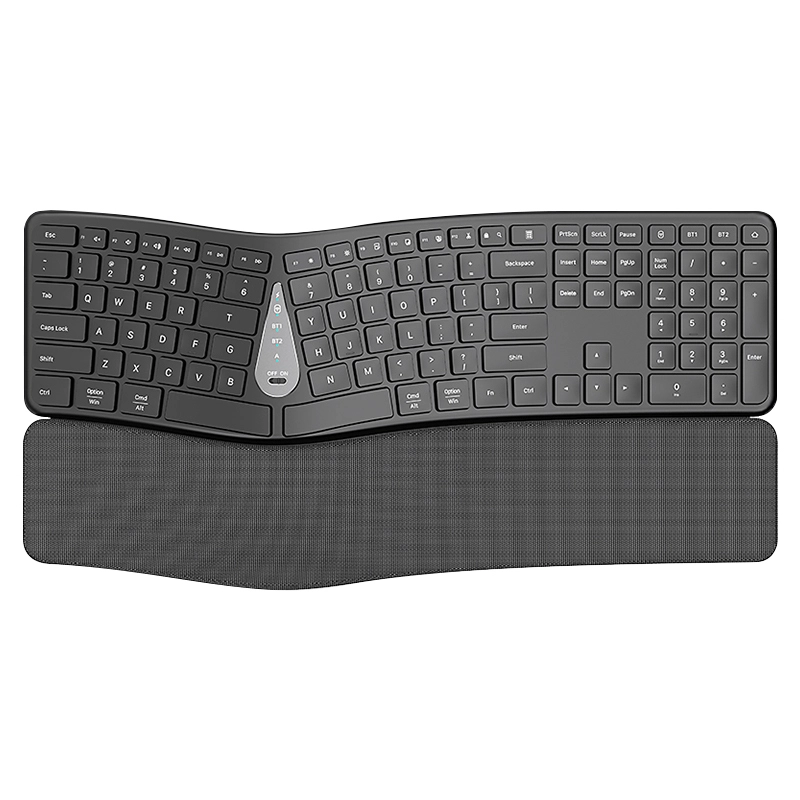
Wireless Ergonomic Split Silent Keyboard
🔹 Curved key layout + 4° tilt: The keyboard features a wave-shaped curved layout, with keys divided according to the natural extension angle of the fingers. Combined with a 4° tilt angle, it reduces wrist strain and prevents fatigue during long typing sessions.
🔹 Integrated soft-padded wrist rest: The built-in memory foam wrist rest conforms to the curve of the palm, supports the wrist to sink naturally, avoids strain from being suspended in the air, and is more comfortable even when working continuously for several hours.
🔹 Silent button design: Utilizing a silent scissor-switch mechanism, the key noise is as low as 35 decibels, ensuring quiet use in open office areas and libraries without disturbing others.
🔹 Wear-resistant and splash-proof: The keycaps are made of frosted, sweat-proof material and will not become oily even after long-term use; the keyboard is splash-proof and easy to clean if spilled with coffee or tea.
🔹 Full-function key layout: Retains a dedicated numeric keypad + multimedia shortcut keys, allowing you to adjust volume and brightness without switching modes, making operation more efficient.
$ 0% OFF
00d
00:
00:
00
Details
5.0
order
quantity:
pieces available sold out
MOQ:
200 Piece
Shipped to:
Choose a country/region
Shipping
Shipping Country/region Estimated Delivery Time Shipping Cost
This Supplier/Shipping Company does not deliver to your selected Country/Region.
Shipment within 1 hours after placing the order
design customization

    oops...!

    no product data.

    Go to homepage
    payments:
    quantity
    Discount
    price
    3-2 (5)

    Dual-mode connectivity (Bluetooth + 2.4G)

    Enjoy the flexibility of smooth transitions between devices with our dual-mode (Bluetooth & 2.4G) wireless ergonomic keyboard. Whether you’re at work or play, easily switch between different devices for a streamlined experience.

    Arc-shaped key layout

    The keys are divided into sections based on the "natural extension arc of the left and right fingers". The left hand area, right hand area and number area are arranged in a wave shape, which reduces the stretching feeling of the fingers moving across the area and makes typing more in line with the physiological curve of the hand.

    4-2 (6)
    8-2 (6)

    Convenient charging experience with low frequency

    The product has a built-in lithium battery with a capacity of approximately 300mAh. The keyboard is equipped with a "low battery indicator light" to show when the remaining battery level is less than 10%, preventing sudden power outages from affecting usage.

    Wireless keyboard with ergonomic split design

    Its keys are ergonomically designed, with a silent key travel of typically 2-3mm, further shortening the keycap movement distance and reducing noise. Wireless keyboards also make desktops tidier, eliminating the hassle of wires.

    9-2 (4)
    7-2 (5)

    Wireless keyboard details

    This full-size 111-key keyboard features 17 shortcut keys and a numeric keypad to help you improve your productivity. In addition, this wireless keyboard includes low-battery LED indicators and an adjustable stand.

    1
    In what specific ways is the ergonomic design of the T1 keyboard reflected?
    Featuring curved keys and a curved frame that conforms to the natural posture of the hand, along with a widened memory foam wrist rest, it can reduce wrist and finger fatigue during long typing sessions and meet the needs of ergonomic sitting posture.
    2
    What connection methods does it support? What is the maximum number of devices that can be connected simultaneously?
    It supports three connection modes: Bluetooth dual device (BT1/BT2) + 2.4G wireless and can connect to 3 devices at the same time (such as computer + tablet + mobile phone), making it more flexible to switch between them.
    3
    Is the keyboard's wrist rest fixed or detachable? What is it made of?
    The wrist rest is detachable, filled with memory foam, and made of breathable mesh material on the outside, ensuring both comfort and ease of cleaning and maintenance.
    4
    What type of keycaps are used? How is the typing feel and noise level?
    Featuring a chiclet keycap design, it offers a clear tactile feedback and a moderate key travel; it also boasts a silent key structure, resulting in typing noise significantly lower than traditional mechanical keyboards, making it suitable for quiet office environments.
    5
    How do I switch input between different connected devices?
    Press the corresponding "BT1/BT2/2.4G" key on the keyboard to switch to the target device with one click, without having to pair or disconnect repeatedly.
    6
    What is the purpose of the double spacebar design?
    The double space bar adapts to the typing habits of different users, allowing them to easily press the space bar even when typing with their left hand, thus improving input efficiency.
    7
    Does the keyboard's 2.4G receiver need to be stored separately? Does it have a built-in storage compartment?
    The keyboard features a built-in receiver storage compartment at the bottom. When not using 2.4G mode, the receiver can be placed inside the compartment to prevent loss.
    8
    Can I wash a dirty wrist rest? What is the correct way to clean it?
    It can be cleaned. First, remove the wrist rest from the keyboard, then gently wipe the surface with a slightly damp soft cloth. Avoid soaking it in water or scrubbing it vigorously with a brush. Let it air dry before reinstalling it.
    9
    Can I use the keyboard while it's charging? Will charging affect the connection stability?
    It supports charging while in use, and Type-C charging will not interfere with the wireless connection signal, so there will be no disconnection or delay issues during use.
    10
    What is the warranty period for this keyboard? What does the warranty cover?
    It offers a 12-month official warranty, which covers non-human-caused functional failures (such as disconnection, button malfunction, and bracket damage); normal wear and tear on the wrist rest and stains on the keycaps are not covered by the warranty.
    Get In Touch With Us
    Just leave your email or phone number in the contact form and we can send you a quote for our products!
    Related Products
    no data
    Ready to work with us ?
    B2B

    OEM

    ODM

    Distributor

    Contact Us
    Copyright © 2025 ZUERST | Sitemap Privacy Policy
    Contact us
    email
    whatsapp
    Contact customer service
    Contact us
    email
    whatsapp
    cancel
    Customer service
    detect